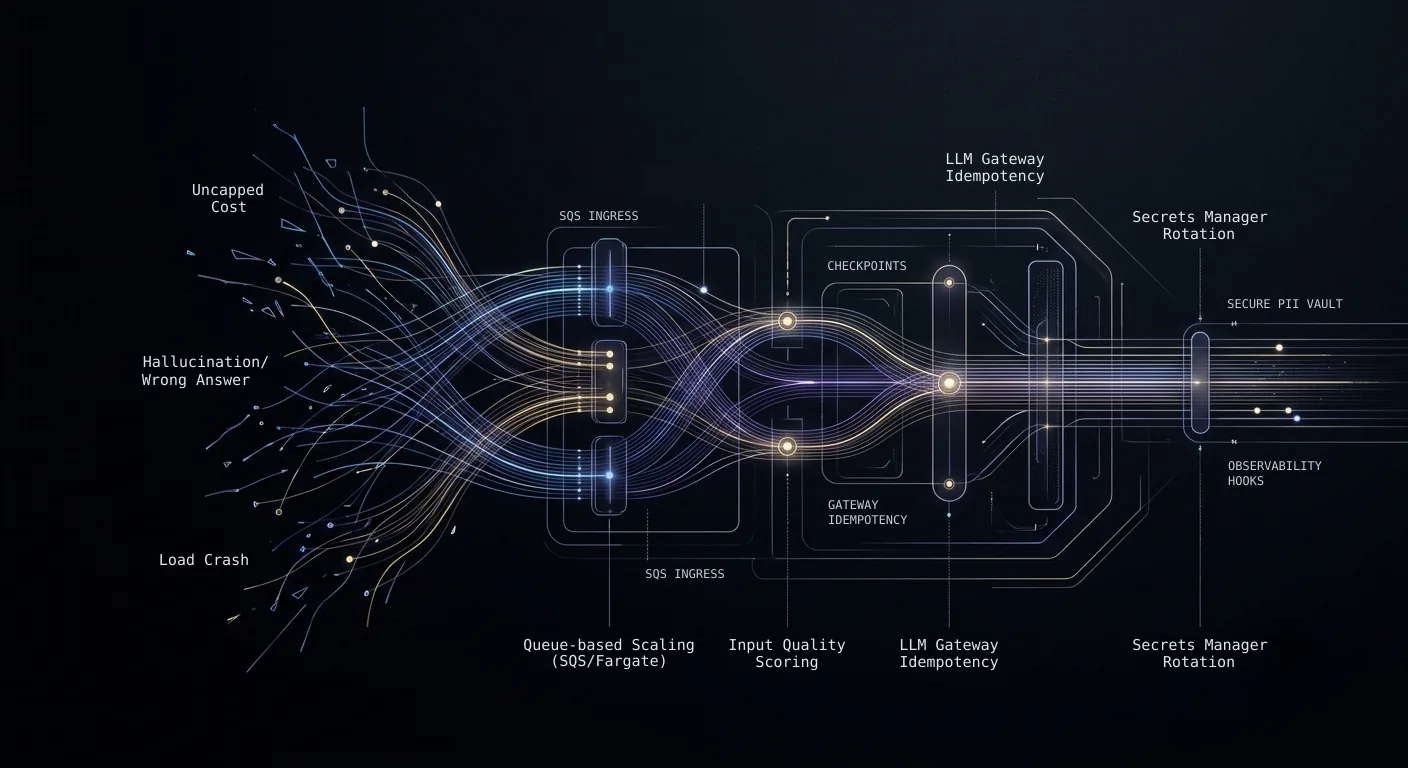
CPU-based autoscaling doesn't fail loudly on an AI service. It fails politely: a spike hits, new tasks take minutes to spin up on CPU metrics, requests time out, and clients do the well-behaved thing - they retry. Except each retry is a fresh LLM call for an answer you already paid for. Nothing throws an error. The bill just comes back wrong, and nobody can say why.
Some of this checklist we learned by chasing a failure we didn't see coming; the rest are defaults we now reach for before the failure arrives - refined across the conversational agents, document-intelligence pipelines, and RAG systems we've run on AWS. The thread: standard web-service defaults - 512MB tasks, CPU scaling, 29-second gateway timeouts - don't fail on AI traffic the way they fail on web traffic. They fail quietly, and they fail expensively.
When we dig into a struggling AI system, three findings keep showing up: nobody can explain the cost, it answered wrongly with confidence, or it fell over under real load. The sections below are organized by AWS service category, because that's how you'll act on them - but every line traces back to one of those three. Read it against your own bill and your own traces, not as gospel.
Compute: Sizing, Scaling, and Orchestration
ECS/Fargate capacity. An AI service is hungrier than it looks. Conversation state, embedding caches, and model client connections push memory well past what a comparable web service needs. Most teams start at the 512MB default and scale up after the first crash. That works, but you pay for it in downtime - and on a system that matters, we won't ship on the default and wait for the crash. Profile after two weeks of real traffic and right-size from data.
Auto-scaling. On a high-value, client-facing AI service, we treat CPU-based scaling as a red flag until proven otherwise - it reacts too slowly for AI traffic. A spike can hit 10x in minutes; by the time new tasks spin up on CPU metrics, requests have timed out, users have retried, and every retry is a duplicate LLM call. You pay twice for the same answer. Scale on application-level metrics instead - active sessions, queue depth, batch size - and put SQS in front to absorb the burst while capacity catches up. Give every request entering the LLM gateway an idempotency key, so retries don't trigger duplicate inference no matter where they come from.
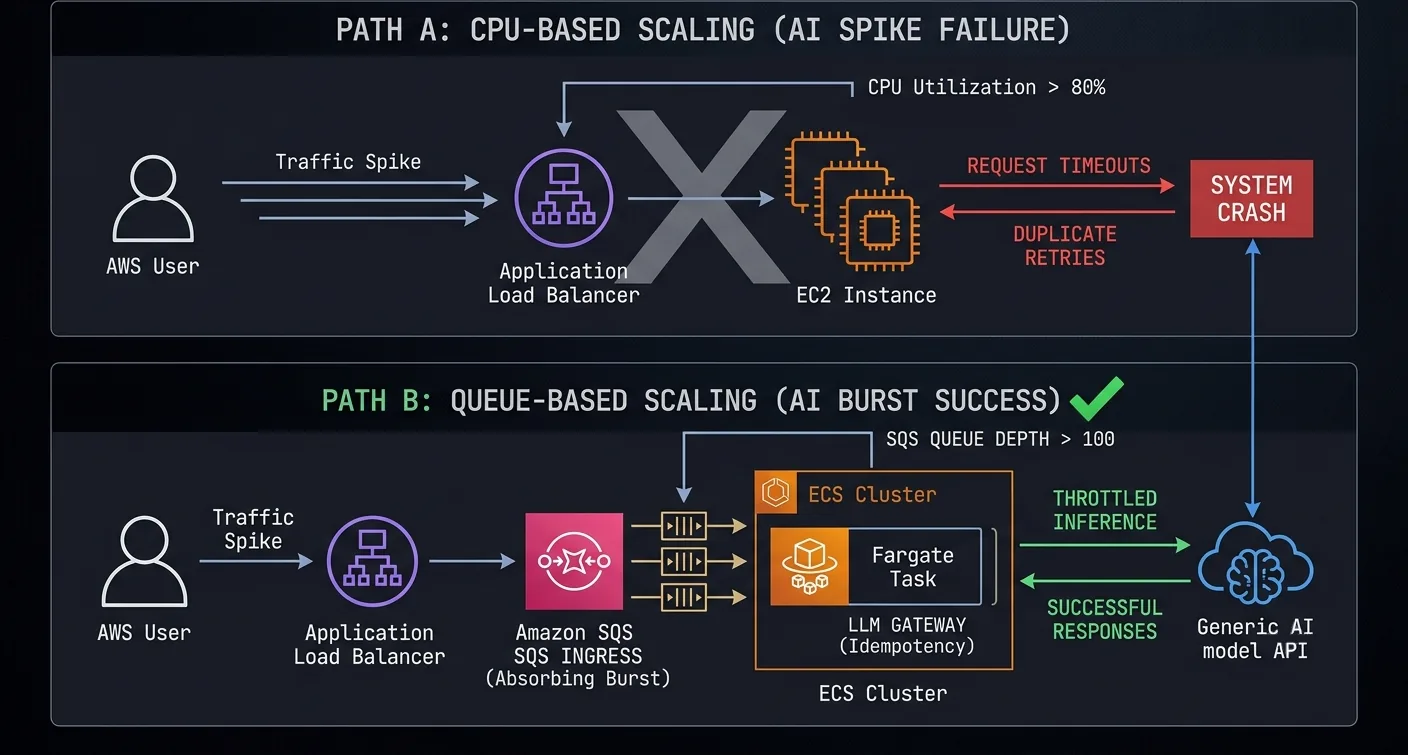
Two things surprise teams here. First, the real scaling bottleneck is often the model provider's rate limit, not your compute. Adding containers doesn't help when the provider is throttling you, so set per-container concurrency with that ceiling in mind. Second, in agentic systems cost multiplies per execution path, not per request: retries, tool calls, and fallbacks all stack. And without per-tenant rate limiting, one tenant's burst starves everyone else.
A retry isn't free: it's a fresh LLM call for an answer you already bought. In agentic systems, one burst fans out into many.
Fargate vs EKS. Default to Fargate. EKS earns its keep when the architecture needs latency-critical sidecars: sub-10ms entitlement checks at the gateway, observability agents, service mesh proxies. For simpler sidecar setups, Fargate handles them fine (platform version 1.4.0+).
Lambda. Wrong abstraction for multi-turn or stateful AI. Right abstraction for batch and event-driven preprocessing: embedding generation, document classification, webhook processing.
Step Functions. Orchestration buried in application code hides retries and lets partial failures leak downstream - inconsistent embeddings, half-processed batches, data loss nobody notices for a week. Step Functions puts error handling, retries, and timeouts at the workflow level, with stage-level observability built in.
Textract. Document-heavy pipelines need OCR with confidence-based routing. Skip the confidence scoring and low-quality OCR flows into your embedding pipeline silently, degrading everything downstream. Route pages below threshold to a multimodal LLM or human review.
Bedrock vs direct API. This is a compliance-versus-flexibility call. Bedrock gets you VPC endpoints, IAM-based access, and coverage under AWS compliance programs - when a deal stalls on data residency or HIPAA, Bedrock usually removes the objection. The tradeoff: narrower model selection, limited batch and prompt-caching discounts, slower access to new models. Direct APIs also make dynamic routing possible - cheap models for classification, expensive ones for reasoning, confidence-based escalation, per-tenant model selection. A single Bedrock endpoint can't express that.
Storage and Data: Vector Database, Search, Caching
Vector database selection.
- pgvector on RDS if you're already on PostgreSQL. Embeddings live next to relational data and joins are trivial. Plan for index tuning at scale.
- OpenSearch for AWS-native hybrid search - BM25 and vector in one managed service. Most precision-critical domains need both.
- Hybrid search stops being optional the moment your domain has precise identifiers - account numbers, registration numbers, case IDs. We've watched pure semantic search hand back a confident, plausible, wrong answer on an exact-match query: the embedding finds something near the identifier and returns it as if it matched. Keyword and vector together is the fix.
- Neptune when the questions are about relationships - ownership chains, dependency graphs, knowledge graphs.
The moment your domain has precise identifiers - account numbers, case IDs, registration numbers - pure semantic search hands you something near the answer, confidently and wrong.
Session state. DynamoDB for sessions that span hours or days (payment flows, async handoffs): durable, no capacity management. Redis for sub-millisecond reads and ephemeral state that can expire on a TTL.
Object storage. S3 with lifecycle policies, and keep raw documents, processed chunks, and embeddings in separate buckets - raw docs need audit-length retention; chunks and embeddings you can always regenerate.
Content quality gates. Score inputs on the way in - OCR confidence, extraction confidence, language detection - and route anything below threshold to human review instead of the embedding pipeline. We learned this chasing what looked like a retrieval problem: the system kept returning irrelevant chunks, so suspicion fell on the embeddings and the model. The real cause was upstream - garbled OCR had quietly polluted the index. When answer quality drops, the model gets blamed first; more often than not it's the extraction.
Garbled OCR poisons the index quietly. When answers degrade, suspect the extraction before the model.
Caching. ElastiCache for response caching, with one hard rule: invalidation must be tied to upstream data-change events. A stale cached answer costs you the original inference plus the recovery conversation that follows it.
Networking: API Gateway, Load Balancing, and Latency
API Gateway. A multi-constraint AI request can take 8–12 seconds - closer to the default 29-second timeout than most teams expect. Set timeouts explicitly - leaving the 29-second default on an AI endpoint is a latent outage we flag on sight. Same goes for payload limits: the default 10MB runs out fast on document-upload endpoints.
Circuit breakers on the LLM gateway. When a provider starts returning 503s or latency blows past budget, the gateway should degrade on purpose: fall back to a cheaper model, serve a cached response, or skip enrichment and answer fast. Without that, one provider outage cascades into timeouts, retries, and a cost spike across every tenant.
ALB health checks. AI services take 15–20 seconds to start - model clients load, caches warm, vector database connections open. Default health-check settings will mark them unhealthy before they finish initializing.
Latency budget. Decide the target before you build: under 4 seconds P50 and under 8 seconds P95 for interactive AI, throughput-optimized for batch. Then split the budget across network, processing, inference, and delivery. That split ends up driving model selection, caching strategy, and every quality-versus-speed tradeoff.
Streaming responses. Streaming partial output cuts perceived latency for interactive AI, but it touches more than the UI. The gateway must support chunked transfer, timeouts split three ways (connection, first-byte, total), and the client has to handle partial responses.
EventBridge. Let AI services make decisions and let downstream systems handle side-effects. EventBridge fans events out without the inference pipeline waiting on anyone.
CloudFront. Useful for static assets. Keep it away from real-time inference - caching dynamic AI responses is how you end up serving stale answers.
Security: IAM, KMS, Secrets Manager, WAF for AI
Secrets Manager. LLM API keys in Secrets Manager with rotation - not env vars, not code, not CI config. On Bedrock, IAM roles replace keys entirely.
KMS encryption. Encrypt vector databases, document storage, and conversation logs at rest - table stakes. The part worth getting right: PII goes in its own encrypted store, keyed by session and user, and the model only ever sees opaque placeholders. The real values resolve server-side when a tool needs them.
Pre-retrieval access control. Enforce access at query time, with metadata filters in the vector database restricting results to documents the user is authorized to see. Filtering after retrieval isn't access control - result counts and latency patterns still reveal what the user wasn't supposed to find.
WAF for AI endpoints. Per-user rate limiting (one user shouldn't be able to exhaust your inference budget), payload inspection for prompt-injection patterns, bot detection, and webhook signature verification before anything gets processed.
IAM and VPC. Least privilege, concretely: the inference service reads the retrieval corpus and writes to the application database, and never touches raw PII vault values. AI processing runs in private subnets, with NAT for outbound API calls - or Bedrock VPC endpoints to skip internet egress entirely.
Observability: CloudWatch, X-Ray, and AI-Specific Monitoring
Traditional APM tells you the request succeeded. In an AI system, the request can succeed and the answer can still be wrong.
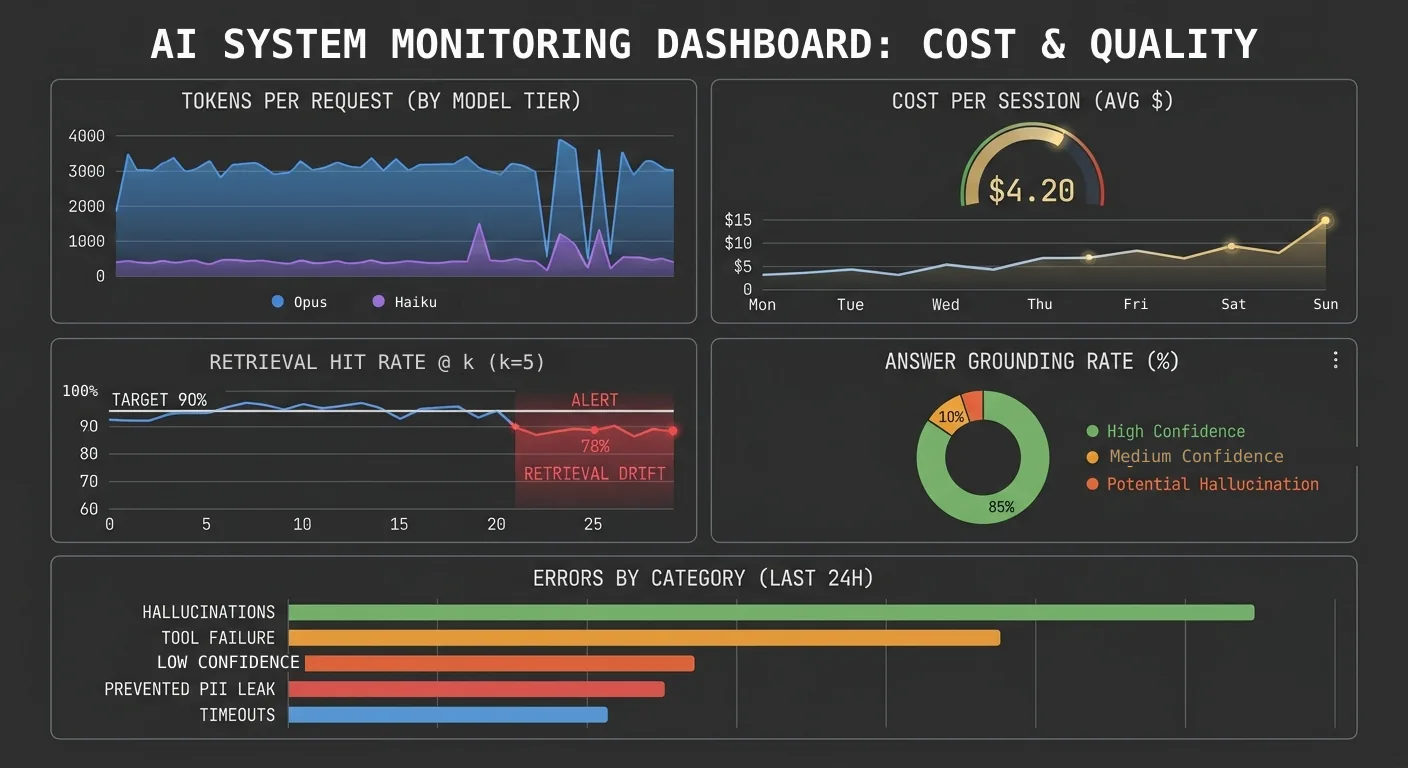
LLM gateway as the anchor. Route every LLM call through one gateway that stamps tenant_id, session_id, pipeline_stage, model_id, and token counts onto each call. That metadata feeds cost attribution, quality monitoring, and billing. Skip it and you have a cost center you can't decompose.
CloudWatch custom metrics. Tokens per request by model tier, cost per session and pipeline stage, retrieval quality (hit rate @ k, MRR, answer grounding rate), and errors by category: tool failure, timeout, hallucination, PII leak prevented, confidence below threshold.
X-Ray tracing. Trace end to end, from API Gateway through AI processing to response. In our traces the LLM is rarely the latency bottleneck; the upstream data fetches usually are.
Alarms. Cost per hour (catches runaway sessions), error-rate spikes (usually a model API outage), P99 past SLA (catch degradation before users do), retrieval quality below threshold (embedding drift or stale data).
Dashboards. Put quality, cost, and latency on one screen, with per-tenant drill-down that shows which usage patterns expose weaknesses. This dashboard has a habit of becoming more important than any single AI feature.
Cost: Budgets, Reserved Capacity, and Right-Sizing
AI cost has two layers: infrastructure (compute, storage, networking) and inference (the LLM calls). Most teams obsess over inference and never right-size infrastructure. One dependency worth stating plainly: everything below assumes inference flows through a centralized gateway. Without one, you can't split costs by tenant, stage, or model.
Separate the AI budget. Give AI its own line in AWS Budgets, split from general infrastructure and broken into infrastructure, inference, and storage. Inference will be the largest and most volatile - the one number worth watching daily.
Reserved capacity and Spot. RDS Reserved Instances for always-on databases (roughly a third off). Fargate Savings Plans for baseline compute. Spot for batch - embedding generation, re-indexing, document processing - where savings run past half.
Batch API pricing. Non-interactive LLM work gets close to half off with batch pricing. If it isn't latency-sensitive, batch should be the default, not the exception.
Right-sizing. Default task sizes are almost always over-provisioned. Profile after two weeks of production traffic; the over-provisioning is usually a meaningful slice of the compute bill.
The Checklist
Compute
- Fargate/EKS task definitions sized from actual AI workload profiling, not defaults
- Auto-scaling on application-level metrics with SQS absorbing burst traffic (CPU-based scaling leads to timeouts and duplicate LLM cost)
- Health check thresholds account for 15–20 second AI service startup
- Batch workloads on separate, cost-optimized compute
- Pipeline orchestration (Step Functions) with stage-level error handling
- Bedrock vs direct API decision made on compliance and model flexibility needs
Storage
- Vector database provisioned with growth headroom
- Hybrid search (vector + keyword) evaluated if domain requires exact identifiers
- S3 lifecycle policies differentiate raw documents, processed chunks, and logs
- Response caching with invalidation tied to upstream data changes (stale cache leads to wrong answers and recovery cost)
- Input quality scoring with threshold-based routing
- Vector database backup and restore tested
- Session state store selected (DynamoDB for durable async, Redis for ephemeral real-time)
Networking
- API Gateway timeout set explicitly for AI latency profile
- End-to-end latency budget defined (under 4s P50 interactive, throughput-optimized for batch)
- ALB health check intervals account for AI startup time
- Circuit breaker on LLM gateway with graceful degradation
- EventBridge decouples AI decisions from downstream side-effects
Security
- LLM API keys in Secrets Manager with rotation (or Bedrock with IAM roles)
- KMS encryption at rest for vector databases, document storage, conversation logs
- PII handling: ingress filtering, encrypted vault, model boundary (placeholders only), egress filtering
- Access control enforced at query time, not post-retrieval (latency patterns leak data)
- WAF with rate limiting and prompt injection payload inspection
- Least-privilege IAM for AI service data store access
- AI processing in private subnets (NAT or Bedrock VPC endpoints)
Observability
- All LLM calls through a single gateway with metadata tagging (no gateway means no cost attribution)
- AI-specific CloudWatch metrics: tokens/request, cost/session, retrieval quality, error categories
- End-to-end X-Ray tracing from ingress through AI processing to response
- Alarms for cost spikes, quality degradation, latency past SLA
- Per-tenant dashboard showing quality, cost, and latency together
Cost
- AI-specific budget in AWS Budgets, separate from general infrastructure, split by infrastructure/inference/storage
- Reserved capacity for predictable workloads, Spot for batch
- Batch API pricing for all non-interactive LLM workloads
- Task right-sizing reviewed after initial production traffic (defaults are almost always over-provisioned)
Content on this page may not be reproduced, distributed, or republished without prior written permission. Sharing links is encouraged. See our Terms of Use for details.